Wiring guides
Air-Pak Select Purge wiring options.
Three ways to connect your dryer. Tap any diagram to enlarge it, or download the PDF for each option.
OPTION 01
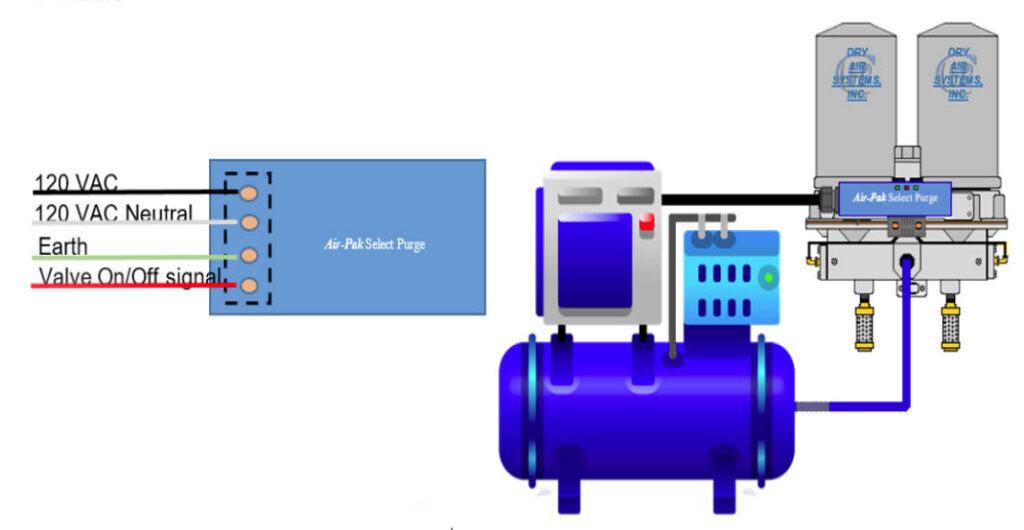
Direct to air compressor pressure control
Connecting the 4-wire system to the air compressor’s pressure control.

BlackConnect to 120 VAC power source
WhiteConnect to 120 VAC common neutral
GreenConnect to earth ground
RedAccepts 24 VDC to 480 VAC. Connect the signal from either:
- the compressor pressure switch on/off side, or
- the compressor inlet valve solenoid signal
Operation check
ONVoltage applied to Red wire (compressor motor running)Dryer cycles and regenerates
OFFNo voltage applied (compressor motor off)Dryer cycles and regeneration flow stop
Note: If the Red wire is never connected, Air-Pak Select Purge still operates automatically, but regeneration air continues while the compressor motor is off. The Red wire can be connected at any time (e.g., when the dryer is moved to another compressor), and the microprocessor resets automatically to work as described above.
OPTION 02
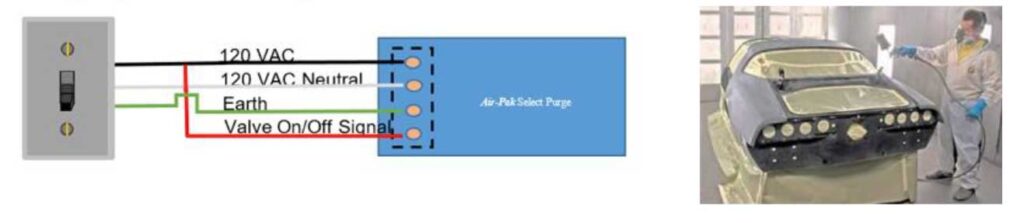
Wired to a dedicated switch
For a dryer installed at point of use, e.g., a paint booth. Air-Pak Select Purge can connect directly to a 110 V dedicated switch.

BlackConnect to 120 VAC dedicated ON/OFF switch
Wht/RedConnect to 120 VAC common neutral
GreenConnect to earth ground
Air-Pak Select Purge is powered when the remote switch is turned “ON” or “OFF.”
OPTION 03

Plugged into a wall receptacle
For a dryer installed at point of use, e.g., a paint booth. Air-Pak Select Purge can connect directly to a 110 V dedicated switch.

BlackConnect to 120 VAC dedicated ON/OFF switch
Wht/RedConnect to 120 VAC common neutral
GreenConnect to earth ground
Air-Pak Select Purge is powered when the remote switch is turned “ON” or “OFF.”